Typed Atomic CSS · Experimental

Atomic CSS, checked when Twig compiles

Style your templates with css() and your design tokens. A misspelled token is a Twig error, not a missing style.

composer require symfony/ux-css

What UX CSS gives you

  • Design tokens

    Colors, spacing and radii, declared once and used by name.

  • Checked at compile time

    A typo is a Twig syntax error, with the template and the line.

  • Completion in your editor

    PhpStorm and VS Code complete properties and tokens.

  • No Node.js

    PHP writes one CSS file. No binary, no watcher.

  • Dark mode in the tokens

    Semantic tokens switch value, templates stay the same.

Typed Atomic CSS for Twig

Add UX CSS to your app.

Atomic CSS from your design tokens, checked when Twig compiles

config/packages/ux_css.yaml
ux_css:
    tokens:
        colors:
            blue:
                600: '#1572b6'
                700: '#105a90'
            gray:
                50: '#f9fafb'
                800: '#1f2937'
                900: '#111827'
            white: '#ffffff'
        spacing:
            sm: '0.5rem'
            md: '1rem'
            lg: '1.5rem'
        radii:
            md: '0.5rem'
    semantic_tokens:
        colors:
            fg:
                base: '{colors.gray.900}'
                _dark: '{colors.gray.50}'
            surface:
                base: '{colors.white}'
                _dark: '{colors.gray.800}'
<article class="{{ css({
    p: 'lg',
    rounded: 'md',
    bg: 'surface',
    color: 'fg',
}) }}">
    <h3 class="{{ css({color: 'fg'}) }}">symfony/ux-css</h3>
    <p class="{{ css({mt: 'sm'}) }}">Typed atomic CSS for Twig.</p>
    <a href="https://github.com/symfony/ux-css" class="{{ css({
        display: 'inline-block',
        mt: 'md',
        px: 'md',
        py: 'sm',
        rounded: 'md',
        bg: 'blue.600',
        color: 'white',
        _hover: {bg: 'blue.700'},
    }) }}">View on GitHub</a>
</article>
Symfony logo

UX CSS

Rendered with css()

Switch the site theme: the card follows, through its semantic tokens.

Generated CSS
Compiled on this request
<h3 class="{{ css({ colr: 'fg' }) }}">
{# Unknown property "colr". Did you mean "color"? #}

<div class="{{ css({ bg: 'surfac' }) }}">
{# Unknown colors token "surfac". Did you mean "surface"? #}

<div class="{{ css({ display: 'flexx' }) }}">
{# Invalid value "flexx" for "display". Did you mean "flex"? #}

<a class="{{ css({ _hovr: { bg: 'blue.700' } }) }}">
{# Unknown condition "_hovr". Did you mean "_hover"? #}

<p class="{{ css({ maxW: '37ch' }) }}">
{# Unknown sizes token "37ch". Write a raw value between brackets, like "[37ch]". #}
Tokens, styles, output

From tokens to one stylesheet.

Tokens as CSS variables

Every token is written as a CSS variable, so hand-written CSS uses the same values.

/* assets/styles/app.css */
.prose a {
    color: var(--colors-blue-600);
    text-underline-offset: var(--spacing-sm);
}

Conditions and breakpoints

Hover, focus, dark mode or a breakpoint, on any property.

<a class="{{ css({
    bg: 'blue.600',
    _hover: { bg: 'blue.700' },
    p: {
        base: 'sm',
        md: 'md',
    },
}) }}">

{# class="bg_blue.600 hover:bg_blue.700 p_sm md:p_md" #}

Values from props

A css() value can come from a variable, such as a component prop. The keys and literal values are still checked when Twig compiles, but a value from a variable is only checked when the template renders in debug mode. Its CSS must exist elsewhere: the same style in another template, or listed in static_css.

{# templates/components/Button.html.twig #}
{% props tone = 'blue.600' %}

<button class="{{ css({
    px: 'md',
    py: 'sm',
    rounded: 'md',
    bg: tone,
    color: 'white',
}) }}">
    {% block content %}{% endblock %}
</button>

{# <twig:Button tone="gray.800">Cancel</twig:Button> #}
{# class="px_md py_sm bdr_md c_white bg_gray.800" #}

One stylesheet, written by PHP

The bundle reads your templates and writes the rules they use. Import the generated file at the top of your main stylesheet, right after the statement that orders the cascade layers. It works the same way with AssetMapper, Symfony Reprise and Webpack Encore.

/* assets/styles/app.css */
@layer reset, base, tokens, components, utilities;

@import '../../var/ux_css/styles.css';

/* ... your own styles */

From the editor to the deploy

Mistakes never reach production.

css() is resolved when Twig compiles the template, against the tokens you declared. A wrong property, token or keyword stops the compilation: on the error page in dev, in lint:twig in CI, and in cache:warmup at deploy.

A typo is not a missing style

Tailwind CSS reads templates as plain text, so a misspelled class gets no CSS and nothing reports it. css() takes a hash that Twig parses, and every key and value is checked.

{# Tailwind CSS: no rule for this class, and no error #}
<div class="bg-surfac">

{# css(): a Twig syntax error, on this line #}
<div class="{{ css({ bg: 'surfac' }) }}">
{# Unknown colors token "surfac". Did you mean "surface"? #}

Typed for your editor

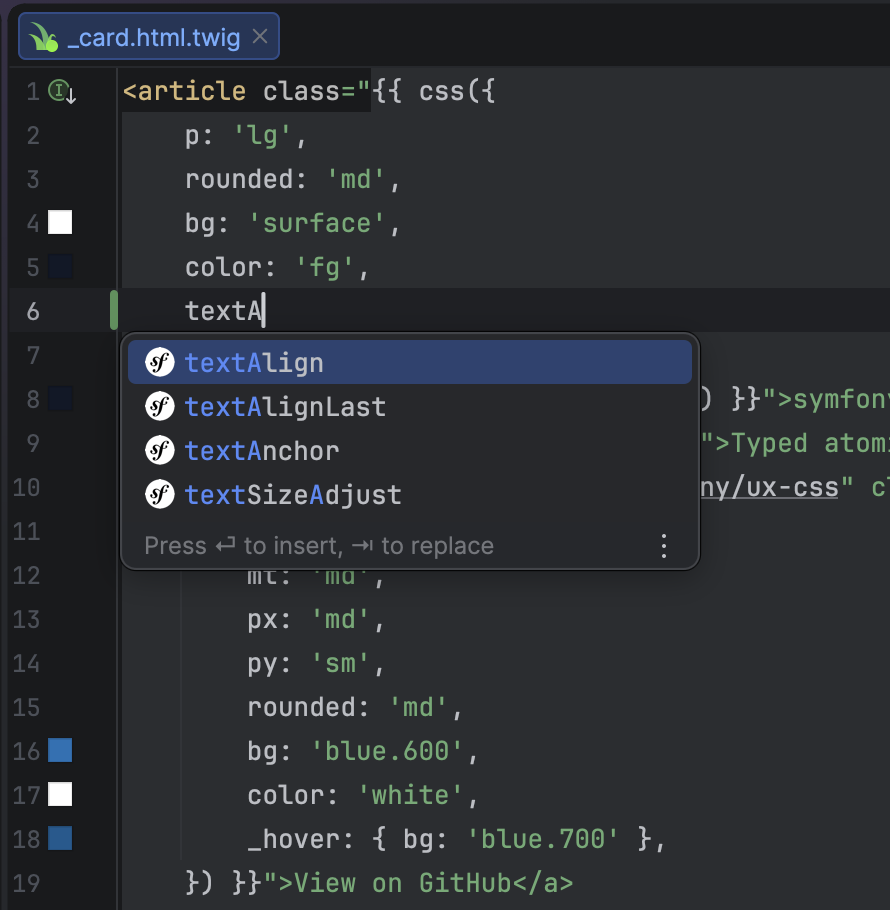
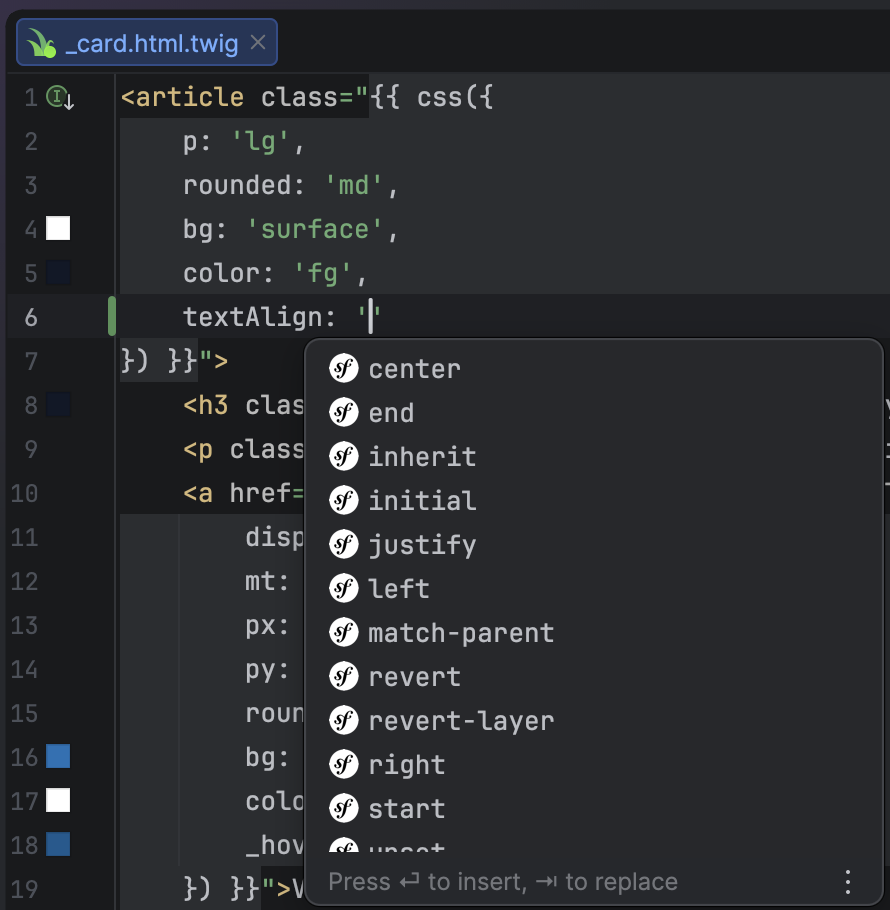
In debug mode, the bundle writes the types of the css() hash from your tokens. The Symfony plugin for PhpStorm and Symfony Language Tools for VS Code complete keys and values from them.

PhpStorm completion list in a Twig template, offering textAlign, textAlignLast, textAnchor and textSizeAdjust after typing textA in a css() call.
Completion for the keys of css().
PhpStorm completion list in a Twig template, offering values for textAlign such as center, end, justify, left and right.
Completion for the values each key accepts.
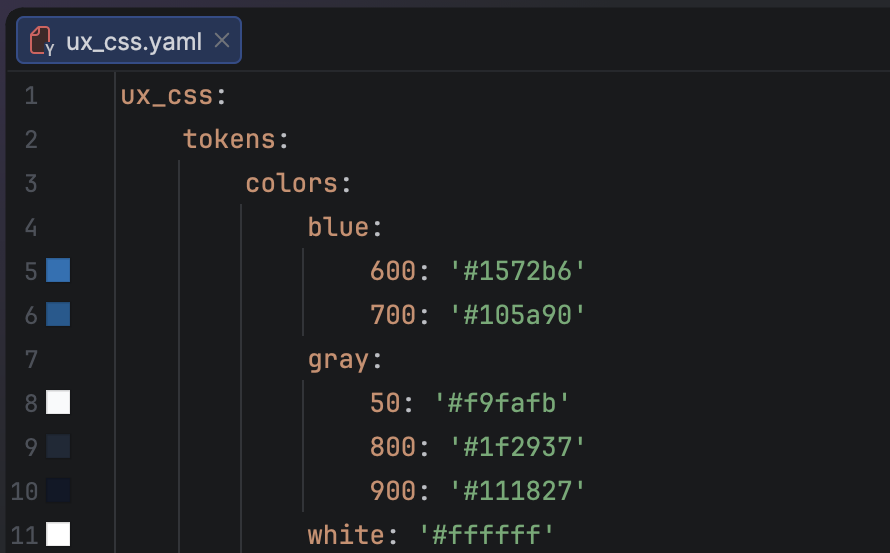
PhpStorm editing config/packages/ux_css.yaml, with a color square in the gutter on each line that declares a hex color token.
Each color token shows its color in the gutter.
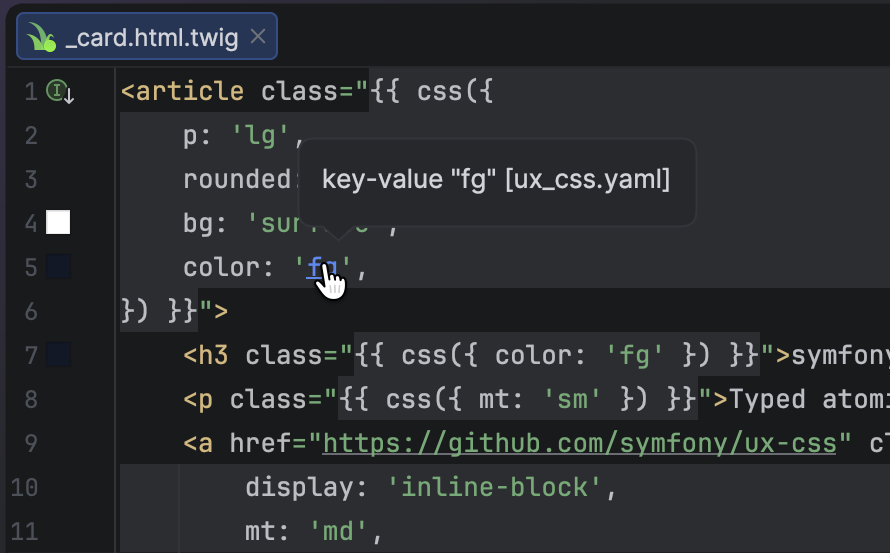
PhpStorm showing a tooltip for the fg token in a Twig template, opened by hovering it with Ctrl held.
Ctrl+click a token to jump to its declaration.

Install UX CSS.

$ composer require symfony/ux-css

More from Symfony UX.

CSS is one package among many. They share the same Stimulus foundation and install the same way.

Image for the Router UX package

Router New

Generate your Symfony routes' URLs in JavaScript

Image for the Image UX package

Image New

Responsive img tags, transformed by your CDN

Image for the Chart.js UX package

Chart.js

Easy charts with Chart.js

Browse every package

Keep UX CSS at hand.

Documentation, the people behind it, and where to ask when something does not behave.